Showing posts with label Computer Networking. Show all posts

Thursday, 3 November 2011

Get Know About Wireless Mesh Network Setup - Part 2


On the side of the coin, if there are healthy number of nodes are required to be in a mesh network setup, it should be partially connected with each other in order to save some bucks but still getting the up to the same level of pros of a fully connected mesh network setup. In partially connected mesh topology, each of the system is get connected with at least one other system in the network so that there would be an alternate route if some sorts of uncertainty occurs. This approach of mesh network is quite easy to understand, troubleshoot and maintain yet it is less expensive compared to fully connected mesh computer networking. However, before finalizing your network setup you people should make advice with an IT consulting expertise to guide you considering your own network specifications and requirements so that ultimately you get really one in all.

Taking in into consideration the above stated tale you people would have enough idea what a mesh network setup really is? Now just let’s get to our core topic of the event, that is, wireless mesh computer networking. Since, it is a wireless network, it works on radio waves to make enable communication between networking nodes. Every wireless network has certain specific boundaries up to which it can make establish connection and reliably send data. 

Get Know About Wireless Mesh Network Setup - Part 1


This is the place where you people going to experience what wireless mesh network setup is and how it works in essence. Before getting step in into the room of wireless network, we should know about what mess network is all about? Well, in mesh computer network every communication node is connected with the other node in the network directly. In other wordings we could state that every computer in the mesh network has a direct dedicated link with every rest of the computer systems. This would really give an advantage of being instant with a particular system in the network setup, poles apart, if at certain point a specific communication path is got damaged, it would be capable of to adopt alternate route to get connected with the desired system. Though, it has reliable computer networking system, but one could easily judge that it is more expensive network setup amongst all of the setups as it requires a separate dedicated link to every node in a mesh topology. For this reason, it could be categorized into two variations, fully connected mesh network and partially connected mesh network. Fully mesh topology is the genuine concept of a mesh network yet it is too expensive for the reason that it demands a direct dedicated communication path for every node. It will not be a nice approach to opt for a mesh network where there is quite healthy number of nodes expected to be in a mesh network, it would be far better decision and reliable network if there is less figure of nodes required to form a mesh network. 

Tuesday, 18 October 2011

Computer Networking Topologies


The layout in which multiple computers as well as other relevant devices like nodes, hubs, links etc, are interconnected with each other is simply termed as computer network topology. Topology is the very primary phase to initiate a healthy network and to understand the working scenario of the layout, so before heading to initiate a network, you must consult some computer network Los Angeles to avail hale services.

Network topologies can be categorized into two broad spans, physical and logical. Physical topologies reflect the physical layout of the interconnected devices involved in a computer network setup. Now we can take examples of LAN – Local Area Network, WAN – Wide Area Network, or even a homemade small network as a physical layout of a computer network. While logical topology depicts how really data and information are to be transferred into physical design. In other words we can also express that the style in which signals are transmitted into communication media used in a network.

Apart from these network categories there are seven different types of topologies including point-to-point Topology, Bus Topology, Star Topology, Ring Topology, Tree Topology, Mesh Topology, and Hybrid Topology.  Though the names might be unusual to you people but not to feel troubled at all as you can get your computer network just a prompt away from computer network Los Angeles.

Thursday, 13 October 2011

Merits of Setting up a Logical Network Layout – Part II


Poles apart from above mentioned summits, you are also required to judge the traffic fashion that will transmit into transmission media and amongst nodes, security tools and threats, future growth consideration, server capacity, FTP server approach, internet issues and so fourth. In addition to this, you people are also required to have recovery tools and plan as well as some basic troubleshooting skills to figure out if some problems occur in near future. Although, computer networking Los Angeles are facilitating giant number of users for excellence network setup and computer remote support for greater accessibility and management of your network. Alongside value added services for maintenance and support from any vendor, it is essential to setup sound and logical computer networks and even that could be outsourced to a pro company or firm. The benefits of outsourcing or having someone to manage or consult about your networking setup and requirements often result going an extra mile for small to medium sized organization. However, large organization can also think of leveraging benefits of 3rd party services to avoid time and resource consumptions for the maintenance and smooth functioning of your computer network alongside saving sufficient cost that could have triggered because of on-site staff and team.

Wednesday, 12 October 2011

Merits of Setting up a Logical Network Layout – Part I


Whenever you people have decided upon to have your own computer network designed, you are not suggested to go straightforwardly but you have to develop a route to follow. Opting for an end result at once should not be your ultimate action but making multiple steps to carry on is the winning and qualitative strategy. As you have made up your mind to establish a network setup, you must think of its logical network design, that is setting up its layout design logically and then implement it to get what you have aimed to. While designing your computer network there are few things which really going to help you out to make it as effective as possible. Now what the few things are? Very essential and uncomplicated, you should have adequate information about your networking components that are going to be used, hardware devices, and style of topologies and protocols that will work in combination with other components. If it sounds bloodcurdling, computer networking Los Angeles will provide more adequate information to figure you out no matter what level of issue you will face regarding computer networking. 

Tuesday, 4 October 2011

Working of Computer Network – Part I

There was a time that one would get huge attention that was having a computer system, but thanks to all concerned parties who enabled everyone to afford at least one computer system or a laptop per head. At very starting era, computers were primarily used for e-mailing and calculation, but it was not the end of world, computer network today it has develop so much that one can do almost everything using computers like they can use it in a schoolwork, they can do shopping, communicate with each other instantly, entertaining themselves by playing on-line music, videos and games in addition too.

Again, limit has no boundary, these systems are not merely used for above mentioned stuff only but it can be further utilized to its utmost level by making computer network amongst them. If there are two or even more computers at a site, they can share data, internet service, and hardware devices like printers, scanners, stereos, TVs systems and so forth...

Basically, a network setup uses various networking devices to enable users to use the computer network services. One should have these devices to make a computer network, Network Interface Card, Hub, Communication channel, Switches or Repeaters etc. Now how a computer network works, depends on the type it has like LAN, MAN, WAN and GAN.

Tuesday, 26 April 2011

Clever Accord: Save Bucks with Computer Networking


Computer networking, where there is bunch of devices attached each other in order to make enable communication and sharing. In essence, people used to do communicate and share data with one another no matter if they are residing within the same building or separate. Normally, if there are people who want to do communication and sharing of data, they would be required to visit each other physically and accomplish their desired task. 

Pro Link Systems - Save Bucks with Computer Networking

Apart from this, in the same context, each one of them would required to have the same device and machine to get complete his work, no doubt, this will required to get loose one's pocket. But there is a far better approach to propose for and that is to get develop a network setup. This setup would gift them to have easy and instant communication as well as, they would also be able to share resources with each other. By sharing resources, they will nor saves huge amount of bucks but there would also be multiple facilities to enjoy being in a computer networking. In an office, only one user should have all the resources attached with it so that everyone can get access to it and use it. Being in a network setup, if a single persona has every sorts of resources, rest of the nodes are not required to waste bucks on purchasing the same item for the reason that by simply getting in into a computer networking, one can easily use all the resources being at his own desk. However, one should need to develop his own setup of network by contacting an IT Consulting firm so that everything gets done in a professional and effective way.

Monday, 25 April 2011

Basics About Star Computer Networking Topology – Part II


In previous part of the topic, you people got to know about the very basics about star computer networking topology and extended star topology. In this part of the topic, you people will get to know further about start computer networking topology in a bit more details. 
The advantage of to opt for an extended star topology is that it covers up a little bit of cabling cost in a traditional star topology, but at the same time it increases a bit of risk as well for the reason that if a sub-central device is got failed, all the associated subordinates will also be cut off from the network setup. To figure it out you need to have contact with an IT consulting  firms, for instance, Pro Link Systems, to help you out whatever problem you facing in context with computer networking. Though, star topology is one of the reliable and mostly used network architecture all over the globe.

Extended Star Computer Networking Topology

Since you have got sufficient information regarding star topology and extended star topology, now you should justified your requirements to come up with a solution which topology will going to suit the best. If you are unable in making decision or justifying things all around you should make advice with an IT Support firms in order to get you whatever accord you the best in all. Overall concept will be summarized in such wordings that a simplified traditional star computer networking topology is all alone match up with the requirements where a network setup is required for a small business or in a small building, while on the other side of the coin, extended star topology will do best and suits good for larger span of site or for a business operating at a larger scale.

Basics About Star Computer Networking Topology – Part I


Computer Networking, a technological arena where bunch of computer systems and resources are gets connected for the ultimate end to provide a stage of communication and sharing. While Topology a set of rules and guidelines how these bunch of computer systems and devices will be attached with each other and will take part in communication. IT Support firms, for instance, Pro Link Systems, stating many set of rules and guidelines need to established such and other sorts of network setup, but in spite of this we will merely get bonding with star computer networking topology for this unique moment. In a star topology, each of the network node has a direct dedicated connection with the central device named Hub. This dedicated connection makes the star topology really reliable for the reason if the certain link is get damaged so it will merely effect the concerned node rather the entire network setup.

Considering the prior tribute tale to star topology, we can judge that it would be an expensive topology, no doubt, for the reason that it requires each node to have a direct connection with the central hub for access. But things are not going in the same way, in this technological pace, we are stepping forward to the stage to get most out of a simple thing. The traditional star topology is customized to get the same level of output, even better than that, with less investment or input you could also say. The newly customized star topology is termed as Extended Star Topology, where there groups are created and maintained. Each group has a direct connection with the hub via a dedicated link while each group has got its own subordinates directly attached with it and indirectly connected with the central hub. Whenever, a subordinate in a group willing to have communication with a node lied in a other group, so initially the sender request will be go through its associated group to central hub, thereafter hub will re-transmit the signals towards the group where the correspondent recipient lying.

Wednesday, 20 April 2011

A Little about Kerberos – Part II


Despite whatever I have mentioned in the very first part of the topic, let’s just see how the process moves on and how a connection got established in order to get a reliable network setup. According to an IT Consulting firms, for instance, Pro Link Systems, rest of the brief information about Kerberos is as follow.


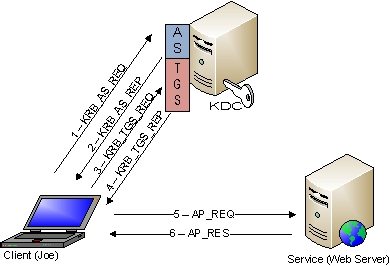
When a client wish to make a connection with the server, first of all it contacts with Authentication Server – AS just to make itself authenticated and so that ultimately it gets a ticket to the next step. As the client is gifted with the ticket, it then moves on to Ticket Granting Server – TGS and confirm its identity by showing the ticket it has got in the very first step. Apart from self-authentication, it also request the TGS for a specific service to use, if the TGS found the ticket useful and genuine, it will issue another ticket to the client for confirmation. As it receives the confirmation ticket, it then step forward to meet with Service Server – SS and shows the ticket to make sure SS that it has got the right to get particular sorts of service. However, the process may seems a little bit complicated and lengthy, but it is not the case so as the client is required to authenticates itself once from the Authentication Server – AS, and it will allot a secret key, in general terminology, a password. Later on if the client wish to get some services from the SS, it will require to re-use the same secret key or ticket in order to get additional service permissions from the TGS to access SS.

Although, adopting Kerberos is a good approach to have a secure network connection and communication, but there are some demerits come along with the usage. For instance, kerberos server is required to be available 24x7 to serves clients and server, if the main protocol is found inactive, network connection will not take place and ultimately, users will not be entertained to carry a secure communication with the server. Regardless of the demerits, adopting Kerberos is a good approach to have secure network connection, but still you are to make advice with IT consulting firm to help you out in order to establish a secure connection.

Tuesday, 19 April 2011

A Little about Kerberos – Part I


Kerberos, which is a protocol that authenticate nodes on a computer networking setup. It comes into play when there is communication going to initiate between multiple computer systems in a network setup. It makes sure that the involved nodes carry on a secure communication over a non-secure computer network. It is accomplished by authenticating identities concerned with the involved nodes in a communication. IT Support expertises, for instance of Pro Link Systems, have stated the following brief text about kerbreos.

Primarily, Kerberos was established to make secure the client-server network and to offer a common authentication, for instance, both of the parties carrying communication justify one another's identity. In essence, Kerberos works on a symmetric key cryptography which is directly related to a trusted third party. This third party is general known as Key Distribution Center – KDC hold within two logical entities in which one is note as Authentication Server or AS while on the side of the coin the other one is known as Ticket Granting Server or TGS. However, both of the entities are important but larger part of the game is played by Tickets, which makes sure the identification of users carrying on communication on a network setup. Regardless of the above mentioned tale, KDC hold in a database that contains secret keys of every user connected on a network. If it is a client or sever, both of the machines has got its secret key with KDC, while KDC makes sure a secure connection between a client and a server by justifying secret keys of both of the parties and generate a session key which is allotted to user and server to established and maintain a secure connection.

Thursday, 7 April 2011

Generally Talking about Wireless Computer Networking – Part IV


  1. WPAN – Wireless Personal Area Network:
It is very common yet is not used at business level as its name suggest by itself, personal. It is used for personal and non-official as it offers not that much of services. One can get in into WPAN by employing Bluetooth and Infra-red technology. These technologies can't cover longer geographical distance as it is limited to maximum range of 10 meters, poles apart, and if Infra-red is opted to choose for connectivity, so both of the devices should be aligned in direct vision which could be problematic if the devices are not properly aligned. Secondly, both of these wireless technologies do not support high data transfer speed, it works at satisfactory level once it gets clear and point-to-point.

These were the wireless technologies kinds which could be used according to the demands of the time and business theme. Although, it is researched that wireless technology is mostly implemented within home computer networking because users in home always room around and willing to get instant internet connection, no doubt, wireless is the sole option to opt for. It is also judged that most of the hot-spots are now installing wireless technologies just to attract bulk of customers. However, it is not the case to get wireless router and there you go, you must consult network administrator to own you reliable yet secured wireless network. Computer Networking Los Angeles is offering the same and various sorts of computer networking all over the Los Angeles to get huge figure of clients to own effective wireless network setup.

Generally Talking about Wireless Computer Networking – Part III


The main problem with wireless technology is of Quality of Service which is shortly notated as QoS, it occurs if there is some sorts of interference between the client and server as the client will not be able to get clear and strong signals. There could be various kinds of wireless network which has got its own importance and point of usage.

  1. WLAN – Wireless Local Area Network.
As the name suggests local area, means the area coverage would be of short span where computers and devices would be connected between offices in the same or even between two or more adjacent buildings. So if such computer networking is formed using wireless technology so it could be termed as Wireless Local Area Network. It is the best approach to form such network where networking is required for temporary basis.
  1. WMANS – Wireless Metropolitan Area Network
It is similar to the WLAN, but the only difference is of geographical size like it covers quite enough space than WLAN for instance it connects a figure of network setups in a city or it could be limited to 50Km in range. It is widely used by enterprises to have secure communication with their outlets or group of offices.
  1. WWAN – Wireless Wide Area Networks:
It is new yet important approach of wireless technology like it offers connections in different cities or even in different countries. Satellites are used to make enable the network connection amongst all the workstation on the earth. This technology is also referred as 2G system sometimes and for more information about 2G systems, you may consult with IT Consulting firm for better understanding and implementation of network setups.

Wednesday, 6 April 2011

Generally Talking about Wireless Computer Networking – Part II

Apart from the all these, the next driving benefits why to adopt wireless setup is that it decrease the downtime, or even avoid it completely. While if we consider wired computer networks, there is huge level of chances downtime occurs. In addition to this, wireless technology saves more enough time than wired computer networking for the reason that it takes too much time, investment and resources in installing and placing cables.

While, adopting radio waves, you just completely shut down the doors for such headache of installing and placing cables, poles apart, with wireless technology you have also got benefit of mobility and portability, you can alter your sitting site to any other place by just carrying your wireless network card and employing a labor to get your table to new spot, and this is it.

However, this fully advantageous technology is not used in offices and organizational entities merely but it could be beneficial and effective if it is adopted various sites for instance, libraries, schools, hotels, airports, railway stations, cafe, or even apartments, where any of the users having wireless enabled devices can get connection to Internet. Tough, there could be some problems as well if it is not implemented properly and by considering adequate networking consultation the way Computer Networking Los Angeles is doing to form fully efficient network setup.

Generally Talking about Wireless Computer Networking – Part I

The system in which bunch of computers and various devices are connected and shared using different communication channels is normally termed as computer network. Same is the case with wireless computer networking, but the difference is of communication medium merely, in this type of computer network the computer machines and other resources are connected without using any physical communication medium, in spite of this, all the devices are connected using wireless devices, more particularly, by employing radio waves, which are in intangible, no doubt. The best advantage of installing a wireless computer networking is to save huge figure of bucks for the reason that if someone intended to form a network setup at larger geographical location; surely it will cost him soundly. But on the other side of the coin, if the same persona opt for wireless technology, it will get him some bulky figure of amount, that could be invest in one or other good way. Considering all these facts and advantages, almost every telecommunication network and organizational entities adopting wireless technology to be in touch with their own surroundings and found to be in consultation with IT consulting firms.

Although, there could be a lot more advantages about wireless computer networking to mention and discuss. For instance, if there is a company who wish to want a portable nature of work, wireless technology is one of the best and even last option to opt for, for the reason because any of the user can get connection with the primary servers from any spot without employing additional devices and communication setup to form.

Monday, 4 April 2011

Brief About Mesh Topology Computer Networking – Part II

There could be two further categories of Mesh Topology, that is, full mesh topology and partial mesh topology. Full Mesh topology, as its name suggests by itself, the network nodes are connected with rest of the nodes using separate private circuits to have direct interaction with all. A simple mesh topology could also be taken as fully meshed topology as there is direct connection of computers. Similar to mesh topology, it is also an expensive topology as it includes private links for every node in a computer networking. Such networks are designed and implemented to use it as backbone if certain problems are occurred that would cause the communication to get laid down.

On the other side of the coin, Partial Mesh topology is a little bit less costly comparatively to Full Mesh topology for the reason that every computer in a partial mesh topology is not connected with rest of the computers directly. Some of the important ones are connected with all nodes in a network setup, while some of the least important are connected with fewer systems to have communication. In this way, a little bit of customization in mesh topology can save bunch of bucks, tough it will not offer the same level of redundancy for the cause users would have got less figure of options to switch. Overall, Mesh topology is quite big enough to handle as one would surely need some guidelines to implement it as IT Consulting firms are offering on-line services to get you what sorts of network setup you dreamed of. No doubt, a strong base can gift longer life to building, similarly, a network based on qualitative spots can yields standard outcome.

Brief About Mesh Topology Computer Networking – Part I

When multiple computers are intended to communicate and share devices with one another instantly, we could term this as a computer network, and the way in which communication took place, is known as simply as Network Topology. Now there are so many types of computer networking topologies but in spite of that, our main focus would be on mesh topology. A topology where every computer system is get connected with rest of the computer systems attached in the network directly. It shows really in a transparent way that one-to-one communication between computers systems are taking place. By considering this entire event we could depict that it could be an expensive network setup, no doubt it is. The main aim of mesh topology is to offer 24x7 services and to entertain users without taking any tension if any of the links is breakdown, because if it is happened, it will not affect the network setup completely, it will merely cut off the direct link between two nodes. However, this does not mean that the two particular computers will not be able to do make communication with each other, it can, it can make connection using indirect path as every node has got direct relation with every other node.


Mesh Topology Computer Networking


By giving a glance at the above diagram, you can judge by yourself that how much it would be complicated and how much it would costly for the reason that it would contains bunch of devices and links to have connection with every computer system in a computer networking. It is nominated as the most expensive topology in all other types of networking topologies. Poles apart, if any of the links gets damaged so figuring it out could also be a little bit tricky, but it can be troubleshooted by making advice with IT Consulting firms. Though, it is a high-priced stuff yet one of the most reliable computer networks to carry on communication with subordinates.

Thursday, 31 March 2011

The Role of IP Multicasting in Computer Networking – Part II


Coming towards another aspect of the multi-casting technology that is how it really works, using by which particular actors it really playing the game of being transmitting data to multiple IP addresses. The mere answer is it has got two major protocols that are used to send multiple packets to multiple IP addresses, namely these two professional are Group Management Protocol and Routing Protocol. Well, you people can judge what activities it will really play in multi-casting by just going via its names with a tiny stress, almost, with no stress at all for the reason, Group Management Protocol is dedicated to established group list to which data is to be set aligned for sending while Routing Protocol, as its name suggesting, it is devoted to route the packets to its respective recipients.

Considering the entire tale stated earlier, though it sounds beneficial yet it is quite successful in some particular business and sectors but still it has not been fully moved into position to be used by everyone for the reason that everyone has got their own demands and requirements. There might be a solid reason by people really did not accepting it or not aware of because they would have no idea what they really can do by adopting this marvelous technology,and the reason is, they are not entertained by proper IT consultants. In whatever way, IT Consulting firms are all the way 24x7 available to provide you consultations regarding every aspect of computer networking so at the ultimate end you are earned with effective network setup.

The Role of IP Multicasting in Computer Networking – Part I


Over here you people going to get to know about IP multi-casting, which would quite easy for you to get it on because it is what happening on around us in our daily routine life. Yes, it is true, it is obvious when you people want to send something very special to your dear ones, you make sure that it get receive to the same person whom you intended to receive, now this is what we call “uni-casting”, but it is not what for which we are poking in into this spot, hang on, we are coming on our chief guest topic, multi-casting. Well, multi-casting is totally opposite to uni-casting as a single message is transferred to multiple recipient from a sole source. In essence, such type of technology is a great alternate against uni-casting and broadcasting technology, but the better approach is to get some guidelines from I.T Support before heading towards initiating your own computer networking.

However, it is not like that it just simply send data to all which is normally termed as broadcasting, in spite of that multi-casting is what where whoever is intended to receive data, he is entertained. Let me serve it with more precise terminology like it is somewhat like TV broadcasting or radio waves transmission where merely those people are entertained by receiving information whomever have turned on their terminals to receive the incoming signals.

Poles apart from the above mentioned story, another additional is that it is a bandwidth friendly system for the reason that it makes less usage of traffic weight over a communication medium or a network setup. Now might one of you would be thinking of where in an exact way multi-casting technology is being used, for instance, it is employed at a peak level in visual conferencing, video learning, live streaming, and all other variety of applications acting on a computer network or wide area network.

In next part of the topic, you people will going to know about more aspect of multi-casting.